Debugging issues such as race conditions in a full-stack app often means jumping between files, tabs and terminals. Tasks like these show the practical differences between windsurf ai vs cursor in day-to-day work.
For developers building modern web apps, having an editor that genuinely understands context across a sprawling codebase without hallucinations is essential.
In this comprehensive evaluation of next-generation AI IDEs, we break down the top tools transforming daily software engineering. From multi-file autonomous flows to local index accuracy, here is a detailed breakdown of what actually works.
⚡ Quick Verdict: Overview at a Glance
Top AI Coding Environments for 2026Windsurf AI
Developers wanting autonomous, predictive multi-file edits with minimal manual prompt tweaking.
Cursor
Engineers seeking surgical prompt control, flexible model selection, and deep Composer workflows.
GitHub Copilot (coding agent)
Teams deeply invested in GitHub issues, pull request workflows, and standard Visual Studio Code.
Table of Contents
1. Windsurf AI
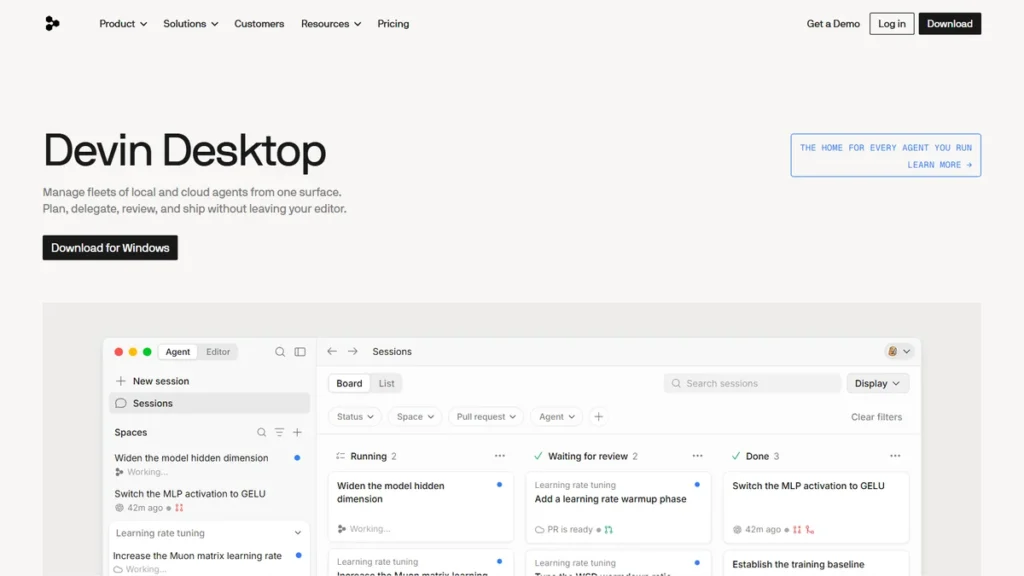
Best Overall FlowWindsurf (renamed Devin Desktop after Cognition acquired it in 2025) is designed so that, in a React and Express monorepo, its Flows can update Stripe webhook handlers, generate new payload interfaces, and update matching database migrations. Windsurf executes modifications across multiple files sequentially, running terminal lint checks automatically between steps.
A standout feature is how little micromanagement the platform requires. The cascade system proactively suggests fixing stale exports in shared utility folders that might otherwise be overlooked. It functions less like a passive auto-complete tool and more like an attentive junior engineer.
- Cascade engine provides outstanding multi-file agentic execution
- Deep workspace awareness with fast vector indexing
- Clean VS Code fork with frictionless extension importing
- Occasional token usage spikes during deep repository scans
- Community plugin ecosystem is still catching up to legacy VS Code
2. Cursor
Best for Precision RefactoringFor the software‘s use on database migration scripts, Cursor is built for precise, reviewable edits. Developers can load complex Prisma schemas and use Cursor Composer with Claude 3.5 Sonnet to draft dynamic filter routes. The inline diff viewer allows users to inspect every single SQL fragment before accepting changes.
The ‘@’ symbol tagging system is remarkably intuitive for referencing specific documentation URLs and function symbols. When setting up staging pipelines, automated workflows—similar to strategies discussed in our guide on employee onboarding software for remote startups—can streamline developer environment setup. Cursor also integrates smoothly into local git hooks.
- Cursor Composer provides granular control over multi-file diffs
- Allows seamless switching between Claude, GPT-4o, and custom endpoints
- Exceptional codebase indexing via smart @-mentions
- Monthly fast-request quota limits can feel restrictive under heavy daily use
- Frequent updates occasionally introduce minor UI regressions
3. GitHub Copilot (coding agent)
Best Ecosystem IntegrationComparing windsurf ai vs cursor vs github copilot highlights key differences in PR automation. GitHub retired the Copilot Workspace technical preview on May 30, 2025; its issue-to-pull-request workflow now lives in the Copilot coding agent, which can be assigned a GitHub issue and opens a pull request with its proposed changes for review.
While inline auto-completions are snappy, the deeper repository reasoning lags behind dedicated forks. It writes unit tests quickly, but can miss edge-case memory leaks unless manually prompted with an explicit error log.
- Seamless native integration with GitHub repositories and PRs
- Predictable flat pricing with no confusing token quotas
- Works smoothly inside standard VS Code and JetBrains IDEs
- Lacks deep multi-file autonomous debugging flows
- Inline suggestions occasionally repeat outdated API syntax
4. Continue.dev
Best Open-Source Local SetupContinue.dev operates inside VS Code and connects directly to local Ollama instances running open-weights models like DeepSeek-Coder. This architecture allows engineering teams to refactor internal modules without sending proprietary source code over external networks. Setup is done through a configuration file.
When running offline, speed depends on the local hardware and model. It can handle inline documentation generation and basic unit test authoring without hiccups, although complex multi-step reasoning struggles compared to cloud-hosted frontier models.
- Completely open source with zero telemetry risks
- Compatible with any OpenAI-compatible API or local Ollama model
- No recurring subscription fees
- Requires manual configuration and troubleshooting
- Multi-file editing capabilities are rudimentary
5. Aider
Best Terminal-First AgentAider runs directly inside the terminal during development tasks. It can implement new sub-command flags and write accompanying unit tests on command. Aider analyzes the local git repository, executes file changes, and automatically commits the working code with an explanatory git commit message.
The terminal-first approach is incredibly lean once you get the hang of it. However, reviewing massive UI diffs in the terminal can strain your eyes compared to the rich side-by-side graphical diff editors in Windsurf or Cursor.
- Automatic, beautifully structured git commits for every code change
- Lightning-fast CLI workflow with zero GUI bloat
- Superb support for top-tier models like Claude 3.5 Sonnet
- No visual editor interface for complex front-end layout work
- Requires comfort with terminal commands and manual API key budgeting
Comparison Table: Feature Comparison 📊
To help you compare the best these recommendations side by side, here is an evaluation of pricing, target audience, and ratings:
| Tool | Best For | Starting Price | Free Plan | Rating |
|---|---|---|---|---|
| Windsurf AI | Proactive autonomous flows | $20/mo | Yes | ⭐ 4.9 / 5.0 |
| Cursor | Precision surgical edits | $20/mo | Yes | ⭐ 4.8 / 5.0 |
| GitHub Copilot | GitHub PR integration | $10/mo | Yes | ⭐ 4.3 / 5.0 |
| Continue.dev | Local & open-source LLMs | Free | Yes | ⭐ 4.2 / 5.0 |
| Aider | Terminal & CLI power users | Free (BYOK) | Yes | ⭐ 4.5 / 5.0 |
How to Choose Between AI Code Editors: Key Evaluation Criteria
Choosing an AI editor goes beyond generic auto-complete speed. When deciding on these tools which is better, your primary benchmark must be multi-file context comprehension and deterministic agentic execution. If an IDE cannot resolve local package imports or refactor three interrelated files safely, it slows you down.
Autonomous action boundaries represent the biggest technical divide in modern AI tooling. Some developers wonder how standalone coding agents compare, asking about these solutions vs claude code in production environments. Terminal-first CLI tools excel at script modifications, but complete IDE forks provide superior visual diffs and immediate break-point debugging.
Another common debate among engineers is the platforms vs copilot or traditional setups like these options vs vscode with plugins. Extension-based plugins often struggle with deep symbol indexing because the native editor architecture restricts deep AST access. Dedicated AI IDE forks index your entire repository into vector stores to feed relevant context directly into inference prompts.
Security and team governance are equally non-negotiable when routing proprietary code through external language models. Zero-data-retention policies are worth confirming before routing code to a remote model. Just as managing credentials across teams requires clear infrastructure—similar to choosing between solutions in our guide on Bitwarden vs 1Password for remote tech teams—your IDE must never train public models on your private keys or codebases.
Evaluate pricing models carefully before committing. Premium AI coding tools typically charge between $10 and $20 per month for heavy model usage. Make sure your chosen editor supports BYOK (Bring Your Own Key) if you want to bypass monthly caps during intense multi-day refactoring sprints.
Frequently Asked Questions
What is the main difference between Windsurf and Cursor? ▾
The battle of the software represents the competition between the two leading AI-native code editors built on top of VS Code forks. Cursor pioneered smart codebase indexing and the multi-file Composer interface. Windsurf introduced predictive Flows and Cascade agents that autonomously execute commands and refactor code across projects with minimal manual intervention.
Are dedicated AI IDEs better than traditional extensions like Copilot? ▾
Yes, for complex multi-file engineering tasks, both Windsurf and Cursor significantly outperform standard extension-based Copilot setups. While Copilot focuses primarily on single-line auto-completion, modern AI IDEs index your entire directory structure into vector databases, allowing them to refactor interrelated dependencies, run shell commands, and fix bugs autonomously.
Can I import my existing VS Code extensions into Windsurf and Cursor? ▾
Both Windsurf and Cursor are built directly on open-source VS Code forks, allowing one-click migration of your themes, keybindings, and extensions. When you install either editor, it automatically detects your existing VS Code profile and imports your favorite plugins without requiring tedious manual reconfigurations.
Which tool handles token limits and costs better between Windsurf and Cursor? ▾
Windsurf’s Pro plan is $20 per month (earlier subscribers kept $15), the same as Cursor Pro at $20 per month. Cursor offers granular model switching (Claude, GPT-4o) and fast-request tracking, but heavy refactoring sessions can exhaust fast credits quickly unless you supply your own API keys.
Are private codebases safe when using AI-native IDEs? ▾
Both platforms offer strict privacy controls. Cursor includes a Privacy Mode that prevents code snippets from being stored or used to train public models. Windsurf operates under enterprise-grade zero-retention data policies. Always ensure Privacy Mode is toggled on in your editor settings before working on sensitive company repositories.

Final Verdict & Recommendation 🏆
When selecting the ideal these recommendations, balance feature depth with user interface simplicity.
When choosing between these tools in 2026, your decision comes down to your personal development style. If you want a proactive AI partner that anticipates next steps, manages terminal commands, and handles multi-file refactoring autonomously, Windsurf takes the crown for day-to-day coding velocity.
If you prefer surgical control over every diff, granular context selection using @-mentions, and flexible model toggling, Cursor remains an unbeatable powerhouse. Both editors outperform legacy extension setups by a mile. For new feature builds, Windsurf functions as the daily driver, while Cursor is relied upon for refactoring intricate legacy codebases.

Written by Giorgi Sakandelidze
I research and compare software tools using official documentation, pricing pages, and verified user feedback to help solopreneurs and creators find the right fit.
🕒 Last updated: 2026-10-14 — We actively monitor tool updates, pricing changes, and feature releases.