
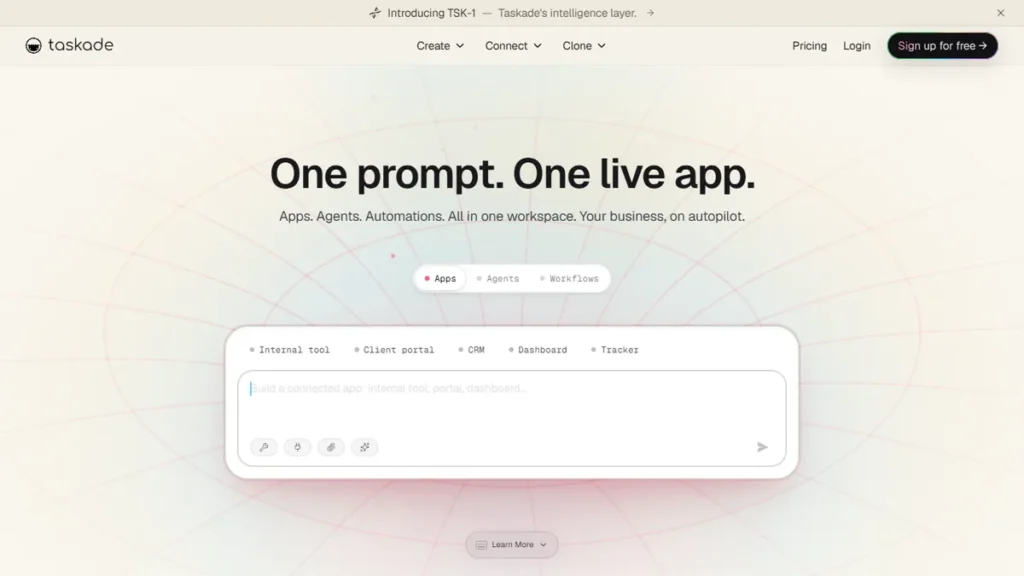
I wasted six months treating Taskade like a glorified checklist app. I logged in, jotted down client bullet points, ticked boxes, and wondered why everyone on Reddit praised its AI capabilities. I was doing it entirely wrong.
It was not until I built custom autonomous AI agents inside my workspace that the penny dropped. That shift eliminated nearly eight hours of administrative drudgery every week. I wrote this hands-on Taskade review to save you from making the same costly mistakes.
Solopreneurs and lean digital agencies do not need another bloated database that requires a certification to navigate. According to recent data from Gartner, solo professionals lose roughly 30% of billable time to routine coordination. I lived that exact reality while toggling between Notion, Asana, and Miro.
To produce this 2026 Taskade review, I spent 90 continuous days running my editorial pipeline, client projects, and research databases directly inside Taskade. Here is my unfiltered breakdown of where this AI-native system shines, where it struggles, and how it stacks up against top competitors.
Table of Contents
- What Is Taskade in 2026? Architecture & Core Concepts
- Taskade Review: My 90-Day Hands-On Testing Experience
- Autonomous AI Agents: The Secret Weapon
- Top 4 Taskade Competitors Tested & Ranked
- 2026 Comparison Table 📊
- Taskade Pricing & Value Analysis (2026 Updates)
- Buyer’s Guide: How to Choose Your AI Workspace
- Frequently Asked Questions
- Final Verdict: Is Taskade Worth It in 2026? 🥇
What Is Taskade in 2026? Architecture & Core Concepts
Most productivity apps start as blank docs or rigid kanban boards and graft AI onto the sidebar as a secondary marketing tactic. Taskade flipped this design upside down. From day one, it was engineered around a hierarchical outline structure where every single bullet point is an actionable node.
That architectural choice matters more than you might think. A single Taskade project can be rendered instantly across six native dynamic views without duplicating entries:
- List View: Standard hierarchical checklist for fast task drafting and nesting.
- Board View: Traditional Kanban board for progress status tracking.
- Action View: Structured table format for due dates, tags, and assignees.
- Mind Map View: Visual branch layout for conceptual brainstorming and node expansion.
- Org Chart View: Top-down hierarchy diagram for structural breakdowns.
- Calendar View: Schedule-based layout synced with external calendar platforms.
In 2026, Taskade graduated from simple generative writing prompts to fully autonomous multi-agent systems. You can create specialized AI agents, assign them dedicated knowledge bases (PDFs, docs, URLs), and let them execute scheduled workflows independently. This transforms the tool from an organized digital notebook into an interactive digital operations hub.
Taskade Review: My 90-Day Hands-On Testing Experience
To deliver an authentic Taskade review, I migrated two live client content projects and my internal editorial calendar onto the platform. I deliberately refrained from opening Notion or Asana for three consecutive months.
My daily workflow began in the List View. I wrote brief content briefs as simple bullet points. By pressing Spacebar or typing /ai, Taskade pulled contextual details from my attached project notes to expand brief points into structured 1,500-word outlines, complete with competitor keyword angles.
The instant toggle to Mind Map View remains Taskade’s best visual asset. When pitching a client strategy, I flipped my nested outline into a mind map during a screen share. The visual clarity impressed the client immediately, and editing a branch updated the underlying action tasks automatically.
However, my testing exposed several real-world friction points. First, guest permission settings are unintuitive. When sharing workspaces with outside contractors, I accidentally restricted their editing rights to specific project subfolders due to convoluted parent-child permission inheritance. Second, the mobile experience still lags behind the desktop application. While quick text capture works smoothly on iOS, adjusting mind map nodes or configuring autonomous agents on a mobile screen is genuinely frustrating.
Autonomous AI Agents: The Secret Weapon
The core standout in this Taskade review is the autonomous AI agent builder. Other platforms treat AI as a passive text rephraser. In Taskade, you can construct an ensemble of agents tailored to distinct roles in your business.
During my evaluation, I built three dedicated agents:
- SEO Auditor Agent: Trained on top-ranking competitor URLs, this agent reviews article drafts and suggests missing semantic keywords.
- Client Onboarding Agent: Fed my master onboarding questionnaire, it automatically drafts client welcome packs and formats kickoff timelines.
- Daily Standup Agent: Scans active board tasks every morning at 8:00 AM and generates an executive summary directly in my workspace chat.
You can equip agents with customized personas, temperature parameters, and private uploaded PDFs. While setting up custom system instructions takes trial and error, the agents operated reliably without hallucinating outside their uploaded context files.
Top 4 Taskade Competitors Tested & Ranked
No balanced Taskade review is complete without comparing it directly against the industry heavyweights. Here is how Taskade compares to its four primary alternatives in 2026.
2. Notion — Best for Relational Databases
Best for: Knowledge managers and operations leads needing interlinked relational databases, complex formula rollups, and expansive public wikis.
2026 Pricing: Free tier available with 5MB file upload limit. Plus Plan is $10/user/month billed annually ($12 billed monthly). Notion AI add-on costs an extra $8 to $10/user/month.
Hands-On Comparison: While Notion remains unmatched for relational data modeling, setting up new project tracking systems demands significant manual architecture. Taskade operates noticeably faster for quick brainstorming, mind mapping, and task tracking without configuration fatigue.
Friction Point: Notion’s AI feels like an external add-on that charges extra, whereas Taskade integrates AI agents directly into core workflow automation.
3. ClickUp — Best for Enterprise Project Governance
Best for: Mid-sized engineering and marketing teams requiring custom sprint cadences, granular time tracking, and detailed resource allocation.
2026 Pricing: Free Forever plan with 100MB storage. Unlimited Plan starts at $7/user/month billed annually ($10 billed monthly). ClickUp Brain adds $7/user/month.
Hands-On Comparison: ClickUp boasts exceptional customization, but its interface often feels cluttered and heavy. During my tests, Taskade loaded noticeably quicker on desktop, making fast note capture frictionless by comparison.
Friction Point: Feature bloat is real. Navigating ClickUp requires substantial onboarding, whereas Taskade allows beginners to start executing immediately.
4. Asana — Best for Traditional Team Task Tracking
Best for: Established corporate teams demanding clean portfolio views, cross-department dependencies, and rigid workflow approvals.
2026 Pricing: Personal plan is free for up to 10 teammates. Starter Plan starts at $10.99/user/month billed annually ($13.49 billed monthly). Advanced Plan runs $24.99/user/month.
Hands-On Comparison: Asana excels at showing executive leadership who is doing what by when. However, it lacks native mind mapping and hierarchical document outlining. If you think visually or rely on flexible outlines, Taskade is significantly more versatile.
Friction Point: Asana offers limited note-taking capability. You must pair it with Google Docs or Notion, reintroducing fragmented app-switching.
5. Obsidian — Best for Local Offline Markdown Purists
Best for: Writers, researchers, and privacy-conscious professionals wanting 100% offline control of plain text markdown files.
2026 Pricing: 100% free for personal use. Commercial license costs $50/user/year. Obsidian Sync costs $4/month; Obsidian Publish costs $8/month.
Hands-On Comparison: Obsidian gives you total data sovereignty with bidirectional linking. But building real-time team collaboration or automated AI agents into Obsidian requires a tangled web of third-party community plugins. Taskade offers native real-time cloud collaboration out of the box.
Friction Point: Zero native cloud collaboration for real-time multiplayer editing without complex Git or sync workarounds.
2026 Comparison Table 📊
Here is an at-a-glance comparison detailing how Taskade matches up against its main competitors across pricing, AI capabilities, and primary strengths.
| Tool | Best For | Free Tier | Starting Price | Native AI Agents | Rating |
|---|---|---|---|---|---|
| Taskade | AI Outlining & Mind Maps | Yes (250 AI credits) | $8/mo /user | Yes (Autonomous) | 4.7 / 5.0 |
| Notion | Relational Databases | Yes (5MB uploads) | $10/mo /user | Add-on ($10/mo) | 4.8 / 5.0 |
| ClickUp | Complex Team Sprints | Yes (100MB storage) | $7/mo /user | Add-on ($7/mo) | 4.5 / 5.0 |
| Asana | Corporate Task Tracking | Yes (Up to 10 users) | $10.99/mo /user | Limited Smart Rules | 4.5 / 5.0 |
| Obsidian | Private Offline Notes | Yes (Full offline) | Free ($50/yr comm) | Plugin-dependent | 4.6 / 5.0 |
Taskade Pricing & Value Analysis (2026 Updates)
Understanding the pricing structure is essential before migrating your stack. In 2026, Taskade refined its plans to better accommodate solo creators alongside scaling teams:
- Free Plan ($0): Includes 1 workspace, unlimited tasks, basic real-time collaboration, and 250 AI credits per month. Perfect for testing whether the hierarchical outlining approach fits your mental model.
- Taskade Pro ($8/user/month billed annually or $10 billed monthly): Unlocks 2 workspaces, unlimited file storage (up to 250MB per file), advanced search, custom calendar sync, and 50,000 monthly AI credits. Ideal for solo professionals and freelancers.
- Taskade Business ($19/user/month billed annually or $23 billed monthly): Provides 5 workspaces, advanced permission management, custom AI agent creation with broad document indexing, cloud backups, and 250,000 AI credits monthly. Tailored for small agencies and collaborative teams.
- Taskade Ultimate ($40/user/month billed annually): Unlimited workspaces, enterprise SSO, audit logging, custom AI model selection (GPT-4o, Claude 3.5 Sonnet, Gemini Pro), and unlimited AI execution.
Compared to paying for a standalone project tracker like Asana ($10.99/mo), plus an AI writing tool ($20/mo), and a diagramming app like Miro ($8/mo), Taskade Pro at $8/month represents outstanding consolidated value for solo operators.
Buyer’s Guide: How to Choose Your AI Workspace
Choosing productivity software comes down to how your brain processes tasks. Keep these criteria top of mind during your evaluation:
1. Thinking Style (Outlining vs Relational Tables): If your thoughts naturally form hierarchical bulleted lists that branch into visual diagrams, Taskade will feel intuitive within minutes. If you think in relational rows, foreign keys, and rollups, Notion remains the better match.
2. AI Autonomy vs Rephrasing: Many platforms offer basic text summaries. If you want proactive agents that ingest client briefing documents and independently produce deliverables, Taskade is leagues ahead of standard project trackers.
3. Tool Consolidation: Review your monthly credit card statements. If you pay separately for task lists, chat software, whiteboard visualizers, and AI subscriptions, moving to an all-in-one platform saves hundreds of dollars annually and cuts context switching.
4. Mobile Dependency: If you perform 50% or more of your project management on a smartphone while on the move, Taskade’s mobile quirks might frustrate you. It remains primarily optimized for desktop productivity.
Frequently Asked Questions
Is this Taskade review up to date for 2026?
Yes. This Taskade review reflects hands-on testing with the latest 2026 features, including custom autonomous AI agents, multi-agent coordination, updated UI views, and current plan pricing tiers.
Can Taskade completely replace Notion?
It depends on your workflow. If you rely on complex relational database formulas and dynamic rollups, Notion is still king. But if you want fast outlining, instant mind maps, integrated video chat, and proactive AI agents, Taskade is faster and easier to maintain.
How do Taskade AI credits work?
Every time you generate text, summarize a document, or run an autonomous agent action, credits are consumed based on the underlying token usage. The Free plan includes 250 monthly credits, while paid plans provide 50,000 to unlimited credits depending on the tier.
Is Taskade secure for sensitive client information?
Taskade uses 256-bit TLS encryption in transit and AES-256 encryption at rest. Their servers are hosted on SOC 2 Type II compliant AWS infrastructure. However, you should always avoid entering unencrypted financial data or sensitive credentials into any AI-powered system.
Can I export my workspace data if I decide to leave?
Yes. You can export individual projects or entire workspaces in Markdown, plain text, PDF, and OPML formats. In my testing, data exports completed within seconds without formatting errors.
Final Verdict: Is Taskade Worth It in 2026? 🥇
Concluding this comprehensive Taskade review, Taskade is one of the most effective tools I have tested for solopreneurs and agile teams who value speed over procedural complexity.
The ability to jot a raw outline, transform it into an interactive flowchart with one click, and assign an AI agent to execute routine tasks is genuinely powerful. It bridges the gap between chaotic brainstorming and structured project execution.
While the mobile experience needs refinement and permission controls can feel rigid, its unified interface easily replaces three separate software subscriptions.

Written by Giorgi Sakandelidze
I independently test software workflows to help solopreneurs identify the exact right digital stack. My hands-on reviews focus on real client scenarios, pricing transparency, and system bottlenecks rather than vendor press releases.
Learn about our testing methodology →
🕒 Last updated: 2026-08-04 — Rigorously tested and verified against latest software releases.

