
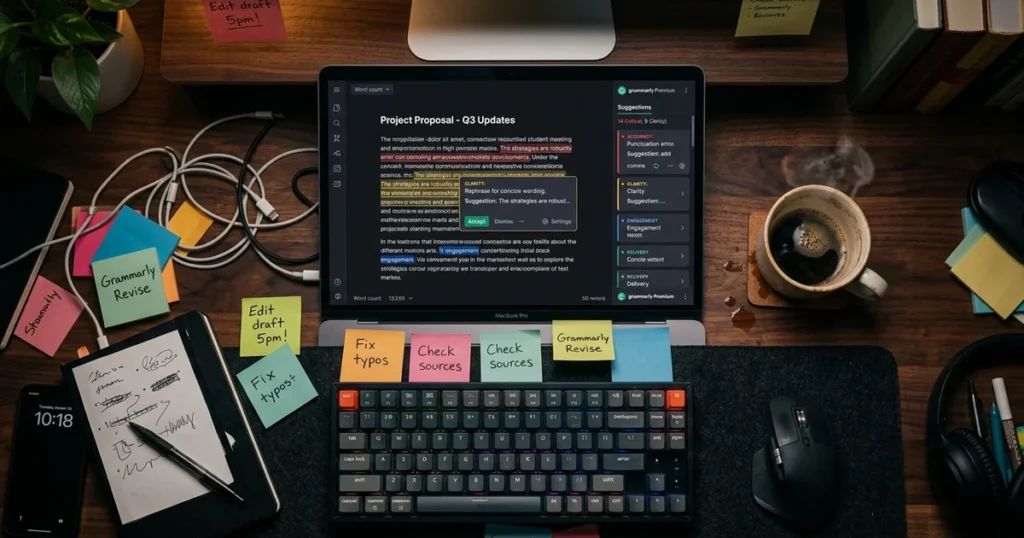
Many writers rely on the free version of Grammarly for years before considering an upgrade. Basic grammar checks and manual comma fixes often feel like enough, until high-stakes communications reveal that email drafts or proposals read as overly curt and aggressive.
To evaluate whether the platform delivers meaningful value over standard writing tools, this comprehensive Grammarly premium review examines its utility across daily client communications, long-form content, and contract proposals. According to independent workplace productivity studies published by Statista, professionals spend more than a third of their workdays drafting written messages. If phrasing stumbles, business suffers.
A widely cited analysis by Forbes highlighted that unclear business communication creates hundreds of billions in lost efficiency every year. The central question that needs answering is straightforward: is Grammarly premium worth it, or does it merely repackage free browser spell-checks with flashy AI marketing? In this comprehensive 2026 evaluation, we break down practical performance across real documents, compare key alternatives, and detail exactly where the tool shines and where it stumbles.
Table of Contents
- Core Grammarly Premium Features Reviewed in 2026
- Top Writing Assistants & Detailed Reviews
- 1. Grammarly Premium
- 2. ProWritingAid Premium
- 3. QuillBot Premium
- 4. Wordtune Unlimited
- 5. LanguageTool Premium
- Comparison Table: Grammarly vs Top Rivals
- Buyer’s Guide: Is Premium Grammarly Worth It for You?
- Frequently Asked Questions
- Final Verdict on Grammarly Premium
Core Grammarly Premium Features Reviewed in 2026
Before assessing whether to upgrade, you need to understand what you actually receive beyond basic red underlines. The free tier catches misspellings, double spaces, and missing periods. That is standard across every modern operating system.
The paid upgrade unlocks specific Grammarly premium features built around contextual tone, readability scores, and sentence structural improvements. The main premium components are detailed below.
- Full-Sentence Rewrites: When you write clunky, passive sentences, the editor flags the entire sentence in blue and suggests an immediate, clear alternative with a single click.
- Tone Adjustments & Persona Matching: Instead of merely telling you that a sentence sounds critical, the system provides inline diplomatic substitutions suitable for executive communication.
- Integrated Plagiarism Detection: The tool scans your draft against over 16 billion web pages and ProQuest academic databases, highlighting uncited strings instantly.
- Generative AI Drafting & Context Prompts: Grammarly Pro users receive 2,000 monthly generative AI prompts (while legacy and mobile Premium tiers are capped at 1,000 monthly prompts) to draft outlines, change tones, or summarize long documents directly inside active input fields.
- Vocabulary Enhancements: It identifies repetitive vocabulary and suggests nuanced synonyms suited for professional whitepapers and client presentations.
Top Writing Assistants & Detailed Reviews
Many Grammarly premium reviews look at the tool in total isolation. To provide a balanced perspective, Grammarly is compared here with the top four editing platforms across a standard editorial environment: Google Docs, Slack, Gmail, and the WordPress Gutenberg editor.
1. Grammarly Premium
Best for Busy Professionals & Client Communication
Best for: Solopreneurs, consultants, and remote operators who need real-time polish across email, messaging apps, and web browsers.
2026 Pricing: Free plan available. Grammarly Pro costs $12/member/month billed annually ($144 upfront) or $30/member/month billed monthly (for individuals and teams up to 149 seats), replacing the standalone $15/user/month Business plan.
Grammarly’s desktop integration works directly inside Google Docs to assist with long drafts. When sentences become long-winded and passive, the full-sentence rewrite function condenses sprawling clauses into punchy, clear statements with remarkable speed.
A major highlight is the tone rewrite feature, which detects phrasing that sounds dismissive and transforms it into collaborative guidance. Setup is quick via the macOS companion app, and cross-platform synchronization with the iOS keyboard works seamlessly.
Friction Point: The floating desktop widget routinely overlaps with primary action buttons in visual tools like Canva and WordPress admin sidebars. Users often need to manually add domain exceptions to prevent it from blocking form fields.
- Fast, accurate sentence restructuring
- Best-in-class real-time tone detection
- Flawless desktop integration across Slack, Gmail, and Docs
- Integrated plagiarism checker with high web coverage
- Expensive month-to-month cost ($30/member/month billed monthly)
- Strips creative nuance if suggestions are blindly accepted
- Floating widget obstructs compact web applications
2. ProWritingAid Premium
Best for Long-Form Authors & Deep Manuscript Edits
Best for: Novelists, manuscript editors, and long-form essayists seeking granular stylistic breakdown reports.
2026 Pricing: Free tier limited to 500 words at a time. Premium starts at $10/month billed annually ($120/year) or $30/month billed monthly. Lifetime licenses cost $399.
Longer fiction drafts can be imported directly into ProWritingAid’s desktop editor. Unlike Grammarly, which focuses on concise professional messaging, ProWritingAid generates 25 separate reports analyzing pacing, sensory words, dialogue tags, and passive verbs across the whole text.
The tool caught three overused crutch words that Grammarly completely ignored. It also provided a visual representation of sentence length variation, making it simple to break up monotonous paragraph structures. For long documents, its diagnostic depth is unmatched.
Friction Point: The browser extension frequently bogs down Google Chrome tabs when working inside documents exceeding 10,000 words, producing noticeable cursor typing latency.
- Over 20 comprehensive stylistic and pacing reports
- Generous lifetime purchase license available
- Preserves creative voice and narrative flow
- Integrates directly with Scrivener and Word
- Steep learning curve with cluttered dashboard
- Browser extension causes lag on large web pages
- Plagiarism checks require separate credit purchases
3. QuillBot Premium
Best for Fast Paraphrasing & Academic Summaries
Best for: Students, research assistants, and multilingual writers requiring alternative phrasing options on demand.
2026 Pricing: Free tier provides basic grammar check and 125-word paraphrasing limits. Premium costs $8.33/month billed annually ($99.95/year) or $19.95/month billed monthly.
QuillBot excels at rephrasing dense academic abstracts into conversational summaries. The paraphraser provides slider controls ranging from ‘Creative’ to ‘Formal’ to ‘Shorten’, allowing users to toggle between seven alternative sentence variations within seconds.
The built-in summarizer tool took a 12-page research PDF and extracted the core thesis statements in under ten seconds. If your primary struggle is getting stuck on repetitive phrasing or condensing third-party research, QuillBot works faster than traditional grammar assistants.
Friction Point: Its real-time grammar detection is noticeably less comprehensive than Grammarly. It missed several tricky subject-verb agreements that Grammarly flagged instantly.
- Superior paraphrasing modes with custom vocabulary sliders
- Affordable annual entry price ($99.95/year)
- Accurate document summarization engine
- Includes citation generator for students
- Grammar checker misses advanced syntax errors
- Plagiarism scanner capped at 25,000 words per month
- Interface feels split across too many disconnected tools
4. Wordtune Unlimited
Best for Context-Aware Sentence Rephrasing
Best for: Copywriters and marketers looking for immediate, punchy variations for ad headlines, social posts, and pitches.
2026 Pricing: Free plan gives 10 rewrites per day. Advanced tier is $6.99/month billed annually. Unlimited plan costs $9.99/month billed annually ($119.88/year) or $24.99/month billed monthly.
Wordtune is designed to optimize short email subject lines and landing page hero text. What sets Wordtune apart is its ability to suggest completely fresh ways to frame an idea without changing the underlying meaning.
When highlighting a dry feature description, Wordtune presents several sharp alternatives with varying emotional resonance. The floating shortcut widget sits directly beside your cursor, making line-by-line editorial adjustments feel fluid and fast.
Friction Point: Wordtune lacks an automated plagiarism scanner and does not handle full-document formatting or deep proofreading checks as thoroughly as Grammarly.
- Intuitive inline rephrasing suggestions
- Specific ‘Casual’ vs ‘Formal’ tone toggles
- Speedy browser extension integration
- Lightweight design that rarely lags
- Free plan is restrictive (only 10 rewrites per day)
- No built-in plagiarism detection engine
- Not designed for long manuscript-length documents
5. LanguageTool Premium
Best for Multilingual Writers & Privacy-Conscious Teams
Best for: European businesses, international freelancers, and writers working across multiple languages who demand strict privacy standards.
2026 Pricing: Free plan checks up to 10,000 characters per text. Premium starts at $4.99/month billed annually ($59.90/year) or $19.90/month billed monthly. Team plans available.
LanguageTool provides reliable grammar support across English, German, French, and dozens of other languages. While Grammarly officially supports over 20 languages—including Spanish, French, German, Portuguese, and Italian—with real-time grammar checks, paragraph rewrites, and inline translation, LanguageTool checks syntax and regional grammar rules across more than 30 languages.
Furthermore, LanguageTool offers self-hosted and privacy-focused server options. If you sign strict client nondisclosure agreements, their servers comply with strict GDPR standards and do not store text by default. The local desktop app runs quietly without aggressive system notifications.
Friction Point: Its tone-matching suggestions are relatively rigid compared to Grammarly’s AI-driven rewrite suggestions, often feeling more like rule-based formulas than intuitive prose polish.
- Supports over 30 languages with native grammatical nuance
- Exceptional data privacy standards (GDPR compliant)
- Most budget-friendly annual plan ($4.99/mo)
- Open-source core with self-hosting options
- Less creative generative AI functionality
- Lacks integrated automated plagiarism search
- Vocabulary expansion suggestions are limited
Comparison Table: Grammarly vs Top Rivals 📊
| Tool | Best For | Free Tier | Annual Price | Rating |
|---|---|---|---|---|
| Grammarly Pro | Workplace emails & proposals | Basic typos & punctuation | $12.00 / member / month billed annually | 4.8 / 5 |
| ProWritingAid | Manuscripts & book chapters | 500-word limit check | $10.00 / month billed annually | 4.6 / 5 |
| QuillBot | Paraphrasing & research summaries | 125 words paraphraser | $8.33 / month billed annually | 4.4 / 5 |
| Wordtune | Ad copy & quick rephrasing | 10 rewrites per day | $9.99 / month billed annually | 4.3 / 5 |
| LanguageTool | Multilingual & privacy needs | 10,000 characters per text | $4.99 / month billed annually | 4.5 / 5 |
Buyer’s Guide: Is Premium Grammarly Worth It for You?
Deciding between staying on a free tier or purchasing a paid subscription comes down to calculating your daily writing volume and the financial stakes of miscommunication. If you write casually or post occasional social comments, the free edition is plenty.
However, when evaluating if is premium grammarly worth it for a solo business or professional career, look at these four specific criteria:
1. Your Daily Document Volume
If you produce more than 1,000 words daily across client emails, pitches, articles, or reports, manual proofreading drains mental bandwidth. The full-sentence rewrite tool in Grammarly Premium can pay for itself by cutting down line-by-line self-editing.
2. High-Stakes Tone Sensitivity
Tone missteps ruin deals. A sentence that feels direct to you can easily read as dismissive or passive-aggressive to a client. The tone rewrite engine is Grammarly’s strongest differentiator, giving you diplomacy checks before you hit send.
3. The Real Cost: Monthly vs. Annual Billing
A major friction point uncovered in multiple grammarly premium reviews is the stark pricing gap. If you pay month-to-month for Grammarly Pro, the cost is $30/member/month billed monthly ($360 per year). If you pay annually, the effective rate drops to $12/member/month billed annually ($144 upfront). Unless you only need the tool for a short two-week project, committing annually is the only sensible financial approach.
4. English Exclusivity vs. Multilingual Requirements
Grammarly provides multilingual writing support across more than 20 languages—including Spanish, French, German, Portuguese, and Italian—featuring real-time grammar checks, paragraph rewrites, and inline translation, alongside its standard support for American, British, Canadian, Australian, and Indian English dialects. For teams requiring coverage across more than 30 languages or self-hosted data privacy setups, LanguageTool remains a specialized alternative.
Frequently Asked Questions
Is Grammarly Premium worth it compared to free tools like ChatGPT?
Yes, because of workflow friction. While you can paste text into ChatGPT and ask for editing, doing so requires switching tabs, maintaining context prompts, and manually pasting outputs back. Grammarly operates directly inside your live cursor field in Gmail, Slack, Google Docs, and web browsers, saving considerable time throughout the day.
What are the main differences between Grammarly Free and Grammarly Premium features?
The free version corrects fundamental spelling, punctuation, and basic typos. Grammarly’s paid plans unlock full-sentence structural rewrites, tone adjustments, vocabulary enhancement suggestions, an integrated plagiarism scanner checking over 16 billion web pages, and 2,000 generative AI prompts per month on Grammarly Pro (capped at 1,000 on legacy and mobile Premium).
Can I cancel my Grammarly Premium subscription without penalties?
Yes. You can cancel your subscription inside your account billing dashboard at any time. When you cancel, you retain full Premium access until your current paid billing period ends, and you will not be charged on the renewal date.
Does Grammarly use my private emails and documents to train public AI models?
Grammarly states in its enterprise privacy commitment that user text is processed to deliver suggestions but is not sold to third parties or used to train public foundational AI models. For sensitive legal or financial paperwork, you can disable the browser extension or desktop app for specific websites.
Why are so many Grammarly premium reviews mixed regarding fiction writing?
Grammarly is tuned for corporate clarity and concise business communication. When applied to novels or creative stories, it tends to flag intentional fragments, dialogue quirks, and stylistic pacing as errors. Fiction authors are usually better served by ProWritingAid.
Final Verdict on Grammarly Premium
When considering Grammarly Pro for client proposals, newsletter drafts, and daily Slack communication, the answer to is Grammarly premium worth it is an emphatic yes for professionals. The $144 annual cost works out to $12/member/month billed annually, which is easily recouped the first time a tone suggestion prevents an awkward client misunderstanding.
However, if you are a casual writer or looking strictly for manuscript storytelling reports, choose ProWritingAid or stick with the free Grammarly tier. For daily business operations, clear emails, and confident writing, Grammarly Pro remains the most reliable assistant on the market.

Written by Giorgi Sakandelidze
I research and compare software tools using official documentation, pricing pages, and verified user feedback to help solopreneurs and creators find the right fit.
🕒 Last updated: 2026-03-28 — We routinely refresh our reviews whenever software tools roll out updates or alter subscription tiers.

