Managing 45 Facebook Ad Variations on a Tight Deadline
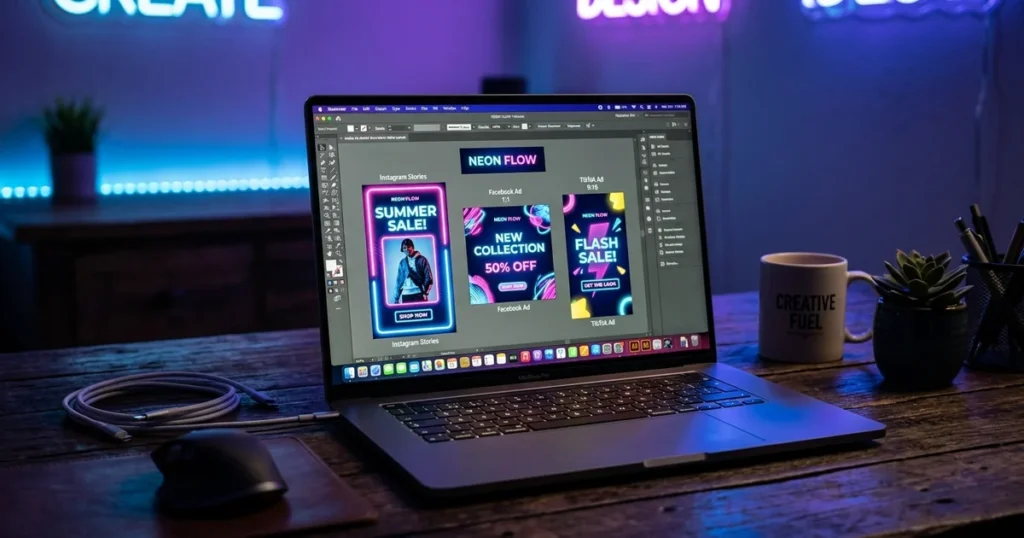
Digital advertising campaigns frequently require dozens of unique image variations on short notice: square feeds, 9:16 vertical stories, split-tested copy, and localized product callouts. Manually realigning layers and typography across dozens of sizes in design suites consumes hours of repetitive production time.
Marketing teams often need an automated production line that understands direct-response design rather than generic artistic templates. That operational challenge is the central focus of this AdCreative.ai review. Digital media buyers are under immense pressure to combat creative fatigue across paid channels, making automated banner generation an absolute operational necessity.
The platform connects directly to ad accounts to generate high volumes of creative assets across e-commerce and B2B campaigns. Based on verified feedback, peer discussions, and epic creative reviews across marketing communities, it is clear where user expectations align with or clash against reality. Below is an unvarnished breakdown of how this tool actually works, where it falls short, and how it compares against the top five AI ad alternatives available today.
Table of Contents
- What Is AdCreative.ai and How Does It Function?
- In Practice: Generating Commercial Creatives at Scale
- The Credit Wall: Real 2026 Pricing Breakdown
- Comparison: The 5 Best AI Ad Creative Tools Ranked
- Detailed Mini-Reviews of the Ranked Competitors
- Buyer’s Guide: Choosing the Right Creative Engine
- Frequently Asked Questions
- Final Verdict: Is AdCreative.ai Worth It?
What Is AdCreative.ai and How Does It Function?
AdCreative.ai is a cloud-based creative automation platform powered by proprietary machine-learning models trained on high-converting paid ad assets. Instead of asking you to drag shapes across an empty canvas, the tool takes your brand logo, primary hex colors, target audience description, and product imagery, then renders full ad banners automatically.
Every layout produced inside the engine comes with an algorithmic conversion score graded between 1 and 100. This score reflects how closely the typography hierarchy, CTA contrast, and negative space align with historically profitable ads in your specific niche.
When evaluating an adcreative ai review, marketers should distinguish between decorative graphic design and direct-response advertising. Standard vector tools like Canva give users artistic freedom, but they do not account for whether a button has enough visual weight to stop someone scrolling a mobile feed. AdCreative.ai focuses almost entirely on CTR and conversion architecture.
In Practice: Generating Commercial Creatives at Scale
In this ad creative ai review, the platform is designed to handle diverse workflows, ranging from e-commerce product promotions to B2B SaaS onboarding campaigns. The setup process begins by entering a live landing page URL. The software scans the site, extracts the brand color palette, and automatically pre-fills brand guidelines.
Users can input multiple headline variations, select target formats (such as 1080×1080 Feed and 1080×1920 Stories), and generate creative options. The dashboard delivers design variations tailored for media buying campaigns, automatically applying subtle drop shadows behind typography and placing high-contrast buttons in standard thumb-strike zones.
However, the engine is not infallible. Users report that the AI sometimes places product images across company logos on horizontal banners, and that long headlines on story layouts can collide with Instagram’s top profile overlay. You still need to skim generated outputs to filter out layout glitches before downloading.
The Credit Wall: Real 2026 Pricing Breakdown
Reading candid adcreative.ai reviews from everyday buyers reveals a consistent grievance: the strict download credit model. Rendering 100 ad variations on your dashboard costs zero credits, but the moment you want to download a high-resolution PNG or push it into your Meta Ads Manager, you consume one credit per asset.
If you launch a creative split test with five distinct design angles across three standard sizes (1:1 Square, 9:16 Story, and 1.91:1 Landscape), you consume 15 credits in a single afternoon. On the $39/month Starter Plan, which provides only 10 monthly credits, you will exceed your allotment immediately.
To run sustained growth testing, marketing teams inevitably need the Professional plan at $249/month ($125/month billed annually) for 50 credits, or Ultimate at $999/month for 100 credits. Solo founders managing a single storefront must calculate whether their monthly ad volume justifies this ongoing overhead.
Comparison: The 5 Best AI Ad Creative Tools Ranked
To provide a comprehensive benchmark for this adcreative review, here is how the engine compares directly against the leading direct-response AI design tools on the market across critical operational factors:
| Tool Name | Best For | Free Tier / Trial | Starting 2026 Price | Our Rating |
|---|---|---|---|---|
| AdCreative.ai | High-Volume Meta & Google Banner Ads | 7-Day Free Trial (10 credits) | $39/month | 4.3 / 5 |
| Pencil AI | Enterprise Video & Motion Ads | Guided Sandbox Demo | From ~$14/month (varies) | 4.4 / 5 |
| Madgicx Creative OS | Full-Funnel Ad Optimization & Creative Insights | 7-Day Free Trial | ~$44–$99/month (varies by ad spend) | 4.2 / 5 |
| Marpipe | Large-Scale Multivariate Asset Testing | Free Product Demo | $199/month (Startup) | 4.0 / 5 |
| QuickAds.ai | Solo Entrepreneurs on a Tight Budget | 7-Day Free Trial | From ~$9/month | 3.9 / 5 |
Detailed Mini-Reviews of the Ranked Competitors
1. Pencil AI: Best for Automated Motion & Video Creatives
Pencil AI focuses heavily on generating animated and video assets alongside static graphics. Pencil can connect to a Shopify catalog and assemble TikTok-style video ads with overlay captions and transitions in minutes.
The software includes an algorithm that predicts creative fatigue before your ad dollars burn out. Published prices vary widely by source (from about $14/month for a Core plan to $119/month on its Shopify listing), so check official pricing, but performance video buyers will appreciate the automation speed.
2. Madgicx Creative OS: Best for Data-Driven Media Buyers
Madgicx is an end-to-end advertising management system that includes a built-in Creative OS suite. Instead of just churning out blind visuals, Madgicx audits your historical ad spend to tell you exactly which design hooks and background shades produced your lowest CPA.
The interface feels intimidating on your first login due to its heavy dashboard metrics, and its pricing scales upward based on your total monthly ad spend. If you want an analytical brain paired with banner creation, Madgicx is an outstanding contender.
3. Marpipe: Best for Multivariate Enterprise Brand Testing
Marpipe treats creative production like a disciplined scientific laboratory. You construct modular template components—such as distinct backgrounds, discount badges, and headline positions—and Marpipe automatically spits out every mathematical combination directly into Meta’s split-testing environment.
While setting up the initial modular Figma frames requires strict technical prep work, it provides definitive statistical data on which exact graphic element drove the purchase. With plans reported at about $199/month (Startup) to $999/month (Enterprise), it is tailored mainly to established marketing teams.
4. QuickAds.ai: Best Budget Alternative for Solopreneurs
QuickAds.ai positions itself as a lightweight, nimble counterpart to AdCreative.ai. It focuses on generating standard 1:1 banners quickly through a clean, simple interface.
The design templates can look slightly more formulaic, but at an entry price reported from about $9 per month (some listings show $39 and up), it eliminates the painful credit bottleneck found on larger platforms for bootstrapped operators.
Buyer’s Guide: Choosing the Right Creative Engine in 2026
Navigating automated ad platforms requires assessing your monthly production requirements rather than just looking at marketing claims. Keep these three decision rules in mind before committing to an annual plan:
1. Evaluate Your Monthly Asset Volume
If your campaigns only refresh two or three times a month, paying for a 100-credit automated generation platform will produce unnecessary overhead. Stick to manual editing suites or budget-friendly generators like QuickAds. If you test 20+ creative variations weekly, AdCreative.ai pays for itself in labor savings.
2. Determine Your Asset Format Priorities
AdCreative.ai excels at static display banners and story slides, but its video capabilities remain basic motion overlays. If your paid customer acquisition strategy relies primarily on short-form UGC video on TikTok or Instagram Reels, choose Pencil AI instead.
3. Audit Ad Account Integration Requirements
Manual file downloading and re-uploading eats away operational hours. Prioritize platforms that offer direct API publishing into Meta Ads Manager, Google Performance Max, and Pinterest. AdCreative.ai handles this direct sync smoothly.
Frequently Asked Questions
Are the conversion scores in AdCreative.ai scientifically reliable?
The conversion scores are calculated using algorithmic data across thousands of verified ad campaigns, but they are not an absolute guarantee. Lower-scoring variations can still outperform higher-scoring assets depending on audience dynamics and live delivery. Treat the score as a helpful design baseline rather than absolute truth.
How does the credit rollover policy work?
Unused download credits roll over to the following billing cycle as long as your paid subscription remains continually active. If you cancel your membership or pause your billing, all accrued rollover credits expire immediately upon the close of that billing cycle.
Can I upload custom fonts and company style assets?
Yes. AdCreative.ai allows you to upload custom OTF and TTF font files directly into your brand kit. This ensures that generated typography aligns precisely with your client’s existing brand identity manuals.
Does AdCreative.ai replace a full human copywriter?
No. While the built-in text generator supplies serviceable, standard direct-response headlines, it frequently relies on clichéd phrasing like “Upgrade Your Routine Today.” You will still want a human marketer to polish and refine primary text for nuances and audience voice.
Final Verdict: Is AdCreative.ai Worth It? 🥇
AdCreative.ai delivers substantial efficiency when campaigns demand dozens of ad variations under tight deadlines. It eliminates repetitive design tasks like resizing backgrounds, tweaking drop shadows, and repositioning CTA buttons. For marketing agencies and ecommerce brands running paid traffic, these time savings easily offset subscription costs.
For solo entrepreneurs with small ad budgets, the 10-credit cap on the entry plan remains a friction point. Sign up for the 7-day trial, generate a complete batch of assets for an upcoming push, and assess whether the automated output moves your conversion needle.

Written by Giorgi Sakandelidze
I research and compare software tools using official documentation, pricing pages, and verified user feedback to help solopreneurs and creators find the right fit.
🕒 Last updated: 2026-03-30 — We routinely refresh pricing, credit allocations, and API features.